
AI Text Cleaner
Remove ChatGPT Formatting, Markdown & Invisible Characters
Paste text from ChatGPT, Claude, or Gemini and clean it in one click. This free AI text cleaner removes markdown symbols like ** and ##, replaces em dashes, strips hidden characters, and straightens smart quotes so your text pastes as clean, plain writing anywhere.
Smart Text Cleaner
Remove formatting clutter without rewriting your words.
Cleaned text appears here
Your wording stays yours.
Recommended cleaning
8/8Fix the common formatting problems people get after copying text from AI tools, websites and editors.
Advanced cleaning0 activeOptional tools that can intentionally remove or normalize content.
Optional tools that can intentionally remove or normalize content.
Runs instantly in your browser
14 cleaners, your rules
Markdown, em dashes, invisible characters, smart quotes, whitespace, bullets, and emojis — toggle each one on or off.
Instant and unlimited
Clean a caption or a 50-page report. No word limit, no sign-up, no waiting.
100% private
All cleaning happens in your browser. Your text is never uploaded, logged, or stored.
What Is an AI Text Cleaner?
An AI text cleaner removes unwanted formatting and copy-paste artifacts from AI-generated text without rewriting the message. CountFlows is a free AI text cleaner for cleaning text copied from ChatGPT, Claude, Gemini, Copilot, and similar tools. It can remove markdown, hidden Unicode characters, smart punctuation, HTML, awkward spacing, em and en dashes, duplicate lines, emojis, bullets, and other text artifacts.
The cleaner runs in your browser using fixed text-processing rules. Your text is not sent to an AI model, and you choose which cleaning options are applied.
How to Clean AI Text Without Rewriting It
- Paste your text into the Original Text box.
- Choose the cleaning options you want. The recommended options handle common formatting problems, while advanced options stay optional.
- Click Clean My Text, review the cleaned output and cleanup report, then copy or download the result.
This is useful when text copied from an AI chat looks correct in the chat window but pastes into Word, Google Docs, email, a CMS, or another editor with unwanted symbols, spacing, or special characters.
What This AI Text Cleaner Removes
Instead of applying one aggressive cleanup rule, CountFlows separates common fixes from optional changes. This helps preserve the text you want to keep.
| Cleanup | What it fixes | Example |
|---|---|---|
| Markdown | Headings, bold or italic markers, links, blockquotes, backticks, and table syntax | **important** becomes important |
| Hidden characters | Zero-width characters, BOMs, control characters, and unusual spaces | Invisible formatting is removed or normalized |
| Smart punctuation | Curly quotes and single-character ellipses | “hello”… becomes "hello"... |
| Dashes | Em and en dashes that may not paste consistently | — and – are converted to keyboard-safe hyphens |
| HTML | HTML tags and encoded entities copied from rendered content | <p>Hello</p> becomes Hello |
| Spacing | Repeated spaces, trailing whitespace, excess blank lines, and stray spaces before punctuation | Messy spacing becomes consistent plain text |
| Optional cleanup | Bullets, emojis, blank lines, duplicate lines, diacritics, and advanced Unicode forms | These stay optional because they can intentionally change visible content |
See What Changed Before You Copy
Cleaning text should not feel like a black box. After a cleanup, CountFlows shows a cleanup report with the rules that changed the text, before-and-after character counts, and a highlighted view of removed or replaced source characters. You can review the changes before using the cleaned version.
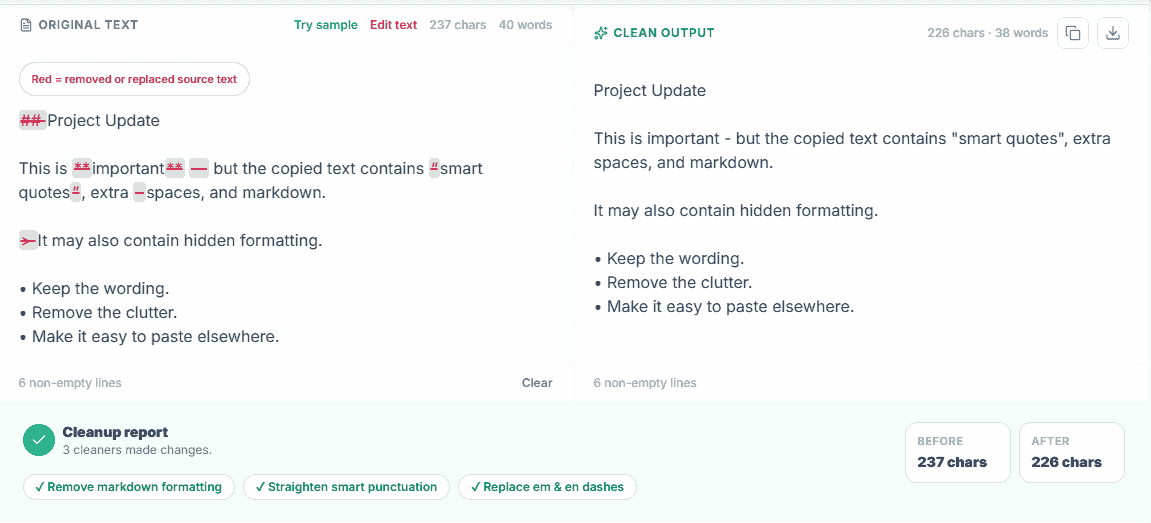
Remove ChatGPT Formatting Without Rewriting the Text
Chat interfaces often render structured output such as headings, bold text, lists, links, code, and other markdown-style formatting. Copying that content into another application can leave visible syntax, rich-text residue, unusual spacing, or Unicode characters behind. Cleaning removes those formatting artifacts while keeping the wording available for you to edit normally.
CountFlows does not try to make AI writing “undetectable” and it does not rewrite sentences. It is a formatting and text-cleanup utility.
If your main issue is formatting copied from ChatGPT, see our guide to removing ChatGPT formatting. You can also read why an em dash is not reliable proof of AI writing.
AI Text Cleaner vs. AI Humanizer
An AI text cleaner fixes formatting, spacing, punctuation, Unicode, markup, and other copy-paste problems. An AI humanizer changes wording or sentence structure. CountFlows is a cleaner, not a humanizer: the goal is to make the text technically cleaner without automatically rewriting your ideas.
Where Cleaned Text Is Useful
Cleaned text is useful before pasting into Word or Google Docs, publishing in a CMS, writing an email, preparing social media copy, working with CSV or JSON, or moving text between applications that handle formatting differently.
After cleaning, use the Character Counter to check publishing limits, the Word Counter for length and text statistics, or the Keyword Density Checker when reviewing content for publication.
Private, Browser-Based Text Cleaning
The cleaning rules run locally in your browser. CountFlows does not need to send the pasted text to a remote AI model to perform the cleanup, so you can clean text without creating an account or waiting for a server response.
If you are comparing browser-based text cleaners, see our guide to CleanPaste.site alternatives.
Need to change capitalization too?
Use the Case Converter after cleaning if you also need sentence case, title case, uppercase, or lowercase formatting.