Topics Covered:
Helpful tools for this guide
If you're looking for a CleanPaste.site alternative, the most useful comparison is not simply which tool has the longest feature list. Privacy, processing method, hidden-character cleanup, formatting controls, signup requirements, and how much control you get over the final text matter more.
CleanPaste.site is one option for cleaning copied text, but other tools focus more heavily on local browser processing, Unicode inspection, Markdown cleanup, whitespace normalization, or individual text-formatting tasks.
Feature check: The product information below was reviewed in September 2026. Features, pricing, and account requirements can change, so check a service's current product and privacy information before pasting sensitive text.
Quick Answer: What Is the Best CleanPaste.site Alternative?
If your priority is free browser-based text cleanup with no signup, CountFlows AI Text Cleaner is a strong option. It can clean Markdown, hidden Unicode characters, HTML, unusual spacing, and selected punctuation while keeping the original wording intact.
Other useful options include GPTCLEANUP, TextCleanr, UnicodeClean, and TextCleaner.io. The best choice depends on whether you need broad formatting cleanup, detailed Unicode inspection, or separate tools for specific text problems.
CleanPaste.site at a Glance
CleanPaste.site currently offers a free plan along with paid plans. Its pricing information says the free tier includes unlimited basic text cleaning when logged in, removal of invisible characters and metadata, and limited access to additional cleanup features.
That makes account requirements, pricing, privacy, and processing behavior worth checking before choosing a cleaner. If you plan to paste private drafts, client work, unpublished material, or personal information, review the service's current privacy documentation first.
What to Look for in a Clean Paste Site
Before choosing a text cleaner, compare these five areas:
- Processing method: Local browser processing can keep your text on your device rather than sending the content to a remote server.
- Signup requirements: Check whether basic cleanup works without an account and whether higher limits require registration.
- Invisible-character cleanup: A useful cleaner should detect or remove zero-width spaces, soft hyphens, non-breaking spaces, and similar Unicode characters when required.
- Formatting controls: Markdown, repeated spacing, HTML, line breaks, and punctuation should be handled without unnecessary rewriting.
- Transparency: A good tool should make it clear what it changes and what it leaves untouched.
Quick Comparison Table
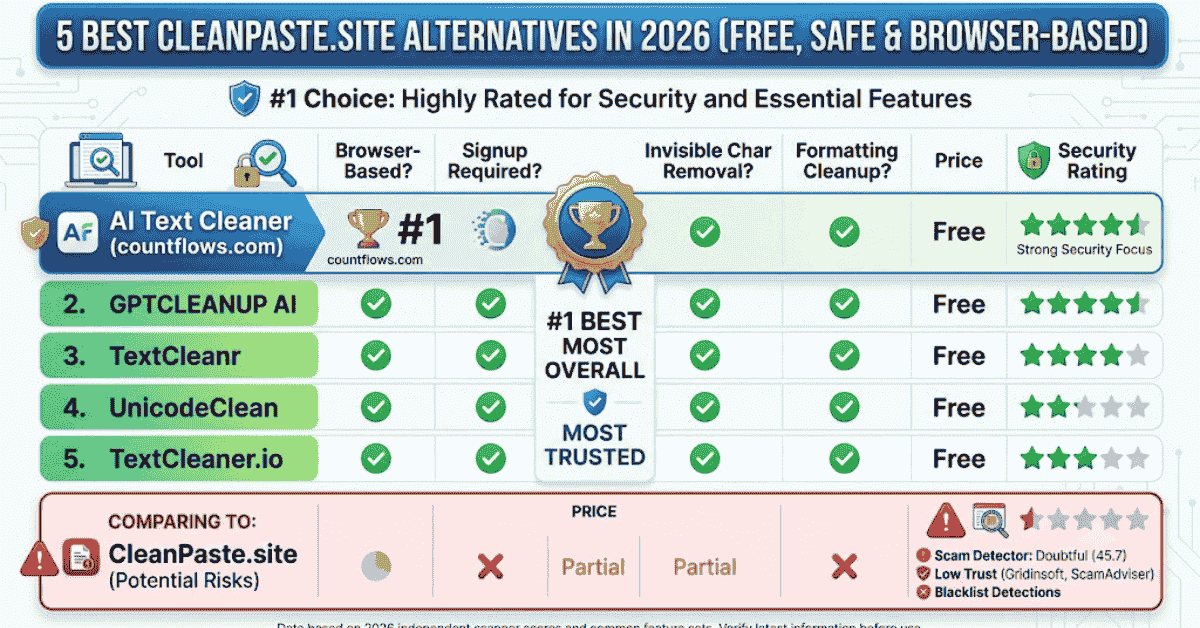
| Tool | Processing / Privacy | Account | Invisible Characters | Formatting Cleanup | Pricing |
|---|---|---|---|---|---|
| CountFlows AI Text Cleaner | Local browser processing | No | Yes | Yes | Free |
| CleanPaste.site | Check current processing details | Free tier uses an account for unlimited basic cleaning | Yes | Basic cleanup | Free + paid |
| GPTCLEANUP | Client-side cleaner | No for cleaner | Yes | Yes | Free cleaner |
| TextCleanr | Web-based; says entered text is not stored | No | Unicode cleanup | Yes | Free |
| UnicodeClean | Local browser processing | No | Advanced inspection and removal | Limited general formatting | Free |
| TextCleaner.io | Local browser processing | No | Not its main focus | Multiple formatting tools | Free |
This table is a practical snapshot rather than a permanent specification. Online services can change features, limits, and pricing over time.
5 Best CleanPaste.site Alternatives
Full disclosure: CountFlows AI Text Cleaner is our own tool. The comparison below focuses on what each option is best suited for so you can choose based on your actual workflow.
1. AI Text Cleaner by CountFlows: Best for All-in-One Cleanup
The CountFlows AI Text Cleaner runs in your browser and is designed for cleaning copied or AI-assisted text without automatically rewriting it. It can remove selected hidden Unicode characters, Markdown, HTML, repeated spacing, smart punctuation, and other formatting artifacts.
No account is required. It is especially useful when text copied from ChatGPT, Claude, Gemini, documents, or websites contains several formatting problems at the same time.
Best for: Writers, editors, bloggers, students, and users who want multiple cleanup controls in one interface.
Limitation: It focuses on cleanup and normalization rather than rewriting or paraphrasing.
2. GPTCLEANUP: Best for AI Copy-Paste Cleanup
GPTCLEANUP provides a text cleaner aimed at content copied from AI tools. Its current cleaner can detect and remove supported invisible Unicode characters and formatting artifacts, with processing handled client-side.
This comparison refers specifically to its text-cleanup functions rather than separate rewriting or humanization features. That distinction matters when your goal is simply to fix copy-paste problems without changing the wording.
Best for: Users who regularly copy output from AI interfaces and want quick character-level cleanup.
Limitation: The wider service includes AI-focused features beyond basic formatting cleanup, so check which function you are using.
3. TextCleanr: Best for General Formatting Cleanup
TextCleanr is a web-based cleaner designed for common copy-paste problems. Its controls cover spaces, line breaks, HTML, Unicode, Word-specific characters, find and replace, text case, and several other formatting tasks.
Its site also states that it does not save or store text entered into the cleaner. This makes it useful when your problem is general text formatting rather than a specific AI-text workflow.
Best for: General formatting cleanup, whitespace normalization, HTML handling, line breaks, and text copied from Word.
Limitation: It is less focused on detailed invisible-character inspection than a dedicated Unicode analysis tool.
4. UnicodeClean: Best for Detailed Unicode Inspection
UnicodeClean focuses on invisible and non-printable characters. It can identify many types of control, spacing, formatting, combining, variation, and other Unicode characters before you decide what to remove.
Its processing takes place locally in the browser. It also offers multiple cleaning levels and detailed inspection features, which can be useful when you want to understand exactly what exists inside the text.
Best for: Developers, editors, data-cleaning tasks, and users who want detailed Unicode inspection.
Limitation: It is primarily a Unicode analysis tool rather than a broad Markdown or copy-paste formatting cleaner.
5. TextCleaner.io: Best for Separate Formatting Tools
TextCleaner.io takes a modular approach. Instead of putting every option into one large cleaner, it provides separate utilities for tasks such as replacing line breaks, removing HTML, normalizing whitespace, changing case, removing duplicate lines, and finding or replacing text.
Its tools state that processing happens locally in the browser. This approach works well when you already know exactly which formatting issue you need to fix.
Best for: Users who prefer individual tools for specific formatting jobs.
Limitation: Detailed invisible-character inspection is not the main focus of its toolset.
Is CleanPaste.site Safe to Use?
A simple "safe" or "unsafe" label does not tell you enough about an online text cleaner. CleanPaste.site is an active service with free and paid options, but the level of privacy you need depends on what you plan to paste into it.
For ordinary non-sensitive text, features and convenience may matter most. For confidential drafts, client documents, unpublished research, or personal information, check the site's current privacy policy, account requirements, and processing method before submitting the text.
Local browser processing can be useful when privacy matters because the text can remain on your device. However, always verify the current behavior of the particular service instead of assuming every browser-based tool processes data in the same way.
How to Use a CleanPaste Alternative in 3 Steps
If your main problem is Markdown, strange spacing, or formatting copied from ChatGPT, our guide to removing ChatGPT formatting covers those issues in more detail.
Step 1: Paste a Copy of Your Text
Open the cleaner you want to use and work with a copy rather than your only version of the document.
Step 2: Select Only the Cleanup You Need
Choose options such as hidden characters, Markdown, HTML, repeated spacing, line breaks, or punctuation. Avoid removing character types that your text actually needs.
Step 3: Review the Output Before Using It
Compare the cleaned result with the original, confirm that the wording has not changed unexpectedly, and then paste it into Word, Google Docs, your CMS, email, or another editor.
Which CleanPaste Alternative Should You Choose?
Choose CountFlows AI Text Cleaner when you want several formatting controls in one browser-based tool without creating an account.
GPTCLEANUP may suit workflows centered on text copied from AI interfaces. TextCleanr is useful for general copy-paste formatting, while UnicodeClean is better for detailed hidden-character inspection. TextCleaner.io makes more sense when you prefer separate utilities for specific cleanup tasks.
The right choice depends less on the brand name and more on the problem you are trying to fix. A user dealing with one invisible character has different needs from someone cleaning Markdown, HTML, spacing, and punctuation together.
Frequently Asked Questions
What is a CleanPaste.site alternative?
A CleanPaste.site alternative is another text-cleaning service that can help remove unwanted formatting, hidden Unicode characters, Markdown, spacing problems, HTML, or other copy-paste artifacts.
Which CleanPaste.site alternative is best?
It depends on the task. CountFlows AI Text Cleaner is useful for broad formatting cleanup, while Unicode-focused tools are better when you need detailed character inspection.
Is CleanPaste.site free?
CleanPaste.site currently offers both free and paid plans. Its pricing information says unlimited basic text cleaning on the free tier is available when logged in, so check the current plan details before using it.
Is CountFlows AI Text Cleaner free?
Yes. CountFlows AI Text Cleaner is free to use and does not require an account.
What are invisible characters?
Invisible characters are Unicode characters that may not display normally on screen, such as zero-width spaces, soft hyphens, and special spacing characters. They can sometimes affect copying, searching, code, or document formatting.
Can a text cleaner remove ChatGPT formatting?
Yes. A formatting-focused cleaner can remove supported Markdown, hidden characters, spacing problems, HTML, and other copy-paste artifacts without necessarily changing the wording.
Which alternative is best for sensitive text?
Prefer a tool that clearly explains how it processes your text and what it stores. Local browser processing is useful when you want the pasted text to remain on your device.
Bottom Line
A good CleanPaste.site alternative should make copied text easier to work with while clearly explaining what will change. Useful features include transparent processing, hidden-character cleanup, formatting controls, and an easy way to review the output before copying it.
CountFlows AI Text Cleaner is a strong option when you want free browser-based cleanup for Markdown, hidden Unicode, HTML, unusual spacing, and selected punctuation without automatic rewriting.
Related Articles
Continue with closely related CountFlows guides.
AI Tools
How to Remove ChatGPT Formatting from Copied AI Text
Discover five easy ways to remove ChatGPT formatting using an AI text cleaner, plain-text paste options, Microsoft Word, Google Docs, and Notepad.
AI & Technology
Is an Em Dash a Sign of AI? Why AI Uses Em Dashes (2026)
Learn why em dashes are associated with AI writing, why AI tools use them, whether they can identify AI-generated text, and how to remove them when needed.
Reading & Writing
How to Edit AI-Generated Content Before Publishing
Learn how to review AI-generated text before publishing by checking facts, verifying citations, rewriting weak sections, adding original evidence, and cleaning unwanted formatting.